|
%SYS
|


|
|
%SYS
|
|
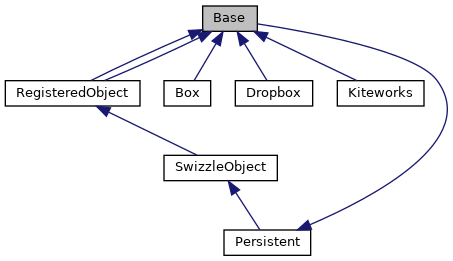
The file manager to be used by MFT classes will be described by a persistent class whose properties are stored in the CACHESYS database. More...
Public Member Functions | |
| _.Library.String | GetAuthorizationCodeURL (_.Library.String redirect, _.Library.String scope, _.Library.String properties, _.Library.Status sc) |
| Get the URL for use by authorization code grant type. | |
| _.Library.Boolean | IsAuthorized (_.Library.String errorMessage) |
| Check if this connection has been authorized. More... | |
| _.Library.Status | MakeHttpRequest (_.Net.HttpRequest httpRequest, _.Library.String method, _.Library.String url, _.Library.Boolean reset) |
| MakeHttpRequest will add authentication to the specified Net.HttpRequest object and. More... | |
| _.Library.Integer | OAuth2ClientCount () |
| Get count of connection which reference the specified OAuth 2.0 client. | |
| _.Library.Status | RevokeToken () |
| Revoke the token associated with this connection. | |
| _.Library.Status | Save () |
| The Save method saves a SYS.MFT.Connection.Base object. More... | |
Static Public Member Functions | |
| _.Library.Status | CreateClient (_.Library.String name, _.Library.String sslConfiguration, _.Library.String clientId, _.Library.String clientSecret, issuer, _.Library.String host, _.Library.Integer port, _.Library.String prefix, _.Library.Boolean useSSL) |
| Create an OAuth 2.0 client with the parameters required to authorize. More... | |
| _.Library.String | DefaultScope () |
| The default scope to use for obtaining the access token. | |
| _.Library.String | DefaultURL () |
| Each subclass will define the DefaultURL method to supply the default URL for the service. | |
| _.Library.Status | DeleteId (_.Library.String name, _.Library.Boolean keepOAuth2) |
| The DeleteId method deletes an existing connection object specified by its name. More... | |
| _.SYS.MFT.Connection.Base | Open (_.Library.String name, _.Library.Status sc) |
| Open a SYS.MFT.Connection.Base subclass instance based on the ConnectionName property. | |
Public Attributes | |
| ApplicationName | |
| ApplicationName is the OAuth2 application name associated with this connection. More... | |
| HttpRequest | |
| Use the same Net.HttpRequest object for all requests in the same session. More... | |
| Name | |
| Name is the name of this connection to a file management service. More... | |
| SSLConfiguration | |
| SSLConfiguration is the name of the SSL Configuration to be used to communicate with the file management API. More... | |
| Service | |
| Service is the name of the service that is accessed by this connection. More... | |
| URL | |
| URL is the base URL for REST access to this service including the final /. More... | |
| Username | |
| Username is the name of the user on whose behalf the file access will take place. More... | |
The file manager to be used by MFT classes will be described by a persistent class whose properties are stored in the CACHESYS database.
This persistent file manager description will contain locations, user name and authentication information - essentially the connection and authentication information for the file management service.
The user of the file management API must create a persistent description of the connection to remote file management service. This connection is defined by the subclass of SYS.MFT.Connection.Base which is implemented for the service provider being used.
The initially supported services all authenticate by using the OAuth 2.0 protocol. The file management connection will use OAuth 2.0 support to do the required authentication. An OAuth2 client must be configured for use by the connection. The details of the client are defined by the requirements of the specific vendor service. The ApplicationName property below is the application name for the OAuth2 client.
The SYS.MFT.Connection>base class contains the base properties and methods for the remote file management services that we support. The Admin_Secure will be required in order to open or save this object.
|
static |
Create an OAuth 2.0 client with the parameters required to authorize.
name is the name to be given to the OAuth 2.0 client.
sslConfiguration is the SSLConfiguration used to make the HTTP request.
clientId and ClientSecret are the id and secret for the OAuth 2.0 client which is obtained from the corresponding App definition.
If addiitonal properties are needed, then the OAuth 2.0 client may be opened and modified.
If a server definition does not yet exist for the OAuth 2.0 client, then a new server definition is created.
Reimplemented in Kiteworks.
|
static |
The DeleteId method deletes an existing connection object specified by its name.
If keepOAuth2 is true, then the associated OAuth 2.0 connection is deleted. Otherwise, the OAuth2 connection is kept.
| _.Library.Boolean IsAuthorized | ( | _.Library.String | errorMessage | ) |
Check if this connection has been authorized.
The default authorization is via OAuth 2.0 access token.
| _.Library.Status MakeHttpRequest | ( | _.Net.HttpRequest | httpRequest, |
| _.Library.String | method, | ||
| _.Library.String | url, | ||
| _.Library.Boolean | reset | ||
| ) |
MakeHttpRequest will add authentication to the specified Net.HttpRequest object and.
execute the request using the specified method with the specified REST parameters added to the URL. After the request is made, the authentication information is removed to avoid making this available to user code.
| _.Library.Status Save | ( | ) |
The Save method saves a SYS.MFT.Connection.Base object.
To save a new Connection object use the following procedure:
| ApplicationName |
ApplicationName is the OAuth2 application name associated with this connection.
The ConnectionId property will be used as the session id for the specific access token.
| HttpRequest |
Use the same Net.HttpRequest object for all requests in the same session.
| Name |
Name is the name of this connection to a file management service.
Name serves as the IDKey for this class.
| SSLConfiguration |
SSLConfiguration is the name of the SSL Configuration to be used to communicate with the file management API.
| Service |
Service is the name of the service that is accessed by this connection.
| URL |
URL is the base URL for REST access to this service including the final /.
URL will default to the base URL for the remote file management service that is provided by the vendor. URL may be modified for locally hosted or private remote implementations.
| Username |
Username is the name of the user on whose behalf the file access will take place.
 1.9.1
1.9.1